

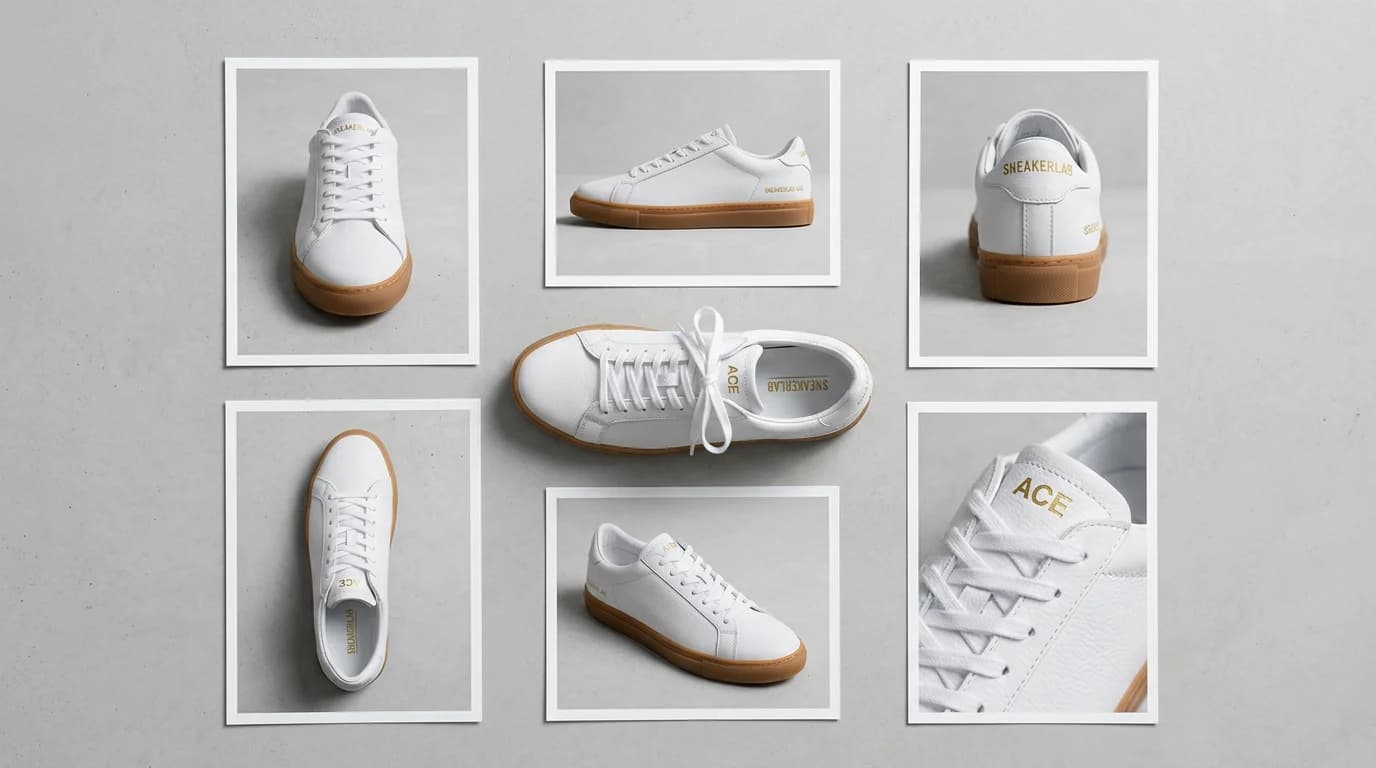
The One-Photo Problem
You have a single product photo. Maybe your supplier sent it. Maybe you shot it quickly on your phone. Now you need to generate multiple camera angles from one product photo for your Amazon listing, your Shopify store, and your social media ads.
The traditional solution is a full product photography session. Set up the product, adjust lighting, shoot from the front. Rotate, shoot from the side. Rotate again, shoot from above. Change the setup for a three-quarter view. Each angle adds time, and if you are paying a photographer, each angle adds cost.
For a single product, this is manageable. For a catalog of 50 or 100 products, it becomes a serious production bottleneck. And if a product gets updated packaging or a new colorway, you are back in the studio.
How AI Camera Angle Generation Works
AI angle generation uses your single product image to understand the three-dimensional shape, materials, and proportions of your product. From that understanding, it synthesizes realistic views from angles you never photographed.
The technology builds an internal model of your product based on visual cues in the original image: shadows that reveal depth, reflections that indicate surface material, edges that define shape. It then renders new perspectives using that model, generating consistent lighting and accurate proportions from each angle.
The results are not always perfect. Highly complex geometries or unusual materials can produce artifacts. But for most consumer products, the generated angles are indistinguishable from real photographs.
Where Multiple Angles Matter Most
E-commerce Listings
Amazon requires multiple images and recommends at least 5-7 per listing. Buyers who can view a product from several angles convert at higher rates than those who see only one view. Amazon's own data shows that listings with 5+ images have significantly higher conversion rates than those with fewer.
Etsy, Shopify, and other platforms follow the same pattern. More angles mean fewer questions, fewer returns, and higher buyer confidence.
Social Media and Ads
Different ad placements benefit from different product orientations. A Facebook feed ad might work best with a front-facing hero shot. An Instagram Story might benefit from an angled view that adds depth. A Pinterest pin might perform better with a top-down flat lay perspective.
Having multiple angles on hand means you can test different views across placements without generating entirely new creative.
Marketing Collateral
Product catalogs, pitch decks, and email campaigns all need product imagery. Having a library of angles for each product lets you choose the most appropriate view for each context without going back to production.
Step-by-Step: Generating Angles with Adverra
Here is how to go from one product photo to a full set of angles.
1. Upload Your Base Image
Start with the clearest, highest-resolution photo you have. Front-facing or three-quarter views work best as starting points because they show the most surface area of the product. Remove any busy backgrounds if possible, though the tool can handle some background complexity.
2. Select Your Angle Set
Choose the angles you need. Common options include front, back, left side, right side, three-quarter left, three-quarter right, top-down, and low angle. For most e-commerce listings, a set of 4-6 angles provides sufficient coverage.
3. Adjust Lighting and Background
Match the lighting and background across all angles. Consistency is critical. If your front-facing shot has soft, diffused lighting on a white background, your side view should match. The tool carries these settings across all generated angles automatically.
4. Review and Refine
Check each generated angle for accuracy. Pay attention to symmetry, proportions, and material rendering. If an angle does not look right, regenerate it with adjusted parameters rather than trying to fix it in post.
Which Camera Angles Convert Best
Not all angles contribute equally to sales. Research and seller experience point to a few consistently high-performing views.
Front-facing remains the most important. This is your hero shot, and it should be the clearest, most polished angle in the set.
Three-quarter view adds depth and dimension that a flat front view cannot convey. It gives buyers a sense of the product's actual physical form.
Top-down works well for flat products, packaged goods, and anything where the top surface is a key feature. It is also the standard view for flat lay styled shots on social media.
Detail close-ups technically are not angles, but they serve the same purpose: showing the product from a perspective the buyer cannot see in the main images. Texture, buttons, stitching, labels.
In-use or lifestyle angles show the product from the perspective of someone actually using it. These angles bridge the gap between product photography and lifestyle photography.
How Many Angles Do You Actually Need?
For most products, 5-7 angles cover the basics. Here is a practical breakdown:
- 1 front-facing hero shot
- 1 three-quarter view
- 1 side view
- 1 back view (if relevant)
- 1 top-down or bottom view
- 1-2 detail close-ups
Going beyond 7 angles rarely adds value unless your product has complex features on every surface. Focus on quality over quantity. Five excellent angles beat ten mediocre ones.
Best Practices for Consistent Multi-Angle Sets
Keep your lighting direction consistent. If the light source is coming from the upper left in your front-facing shot, it should come from the equivalent position in every other angle. Inconsistent lighting makes the images look like they belong to different products.
Maintain the same background and shadow treatment. If your front view has a soft drop shadow, every angle should have a proportionally similar shadow. This visual consistency signals professionalism.
Use the same crop and padding ratio across angles. Products should occupy roughly the same proportion of the frame in every image. This creates a clean, uniform look when the images appear together in a listing or gallery.
For a deeper look at product photography techniques that apply to both AI and traditional methods, check out our professional product photography secrets. And for platform-specific guidance on using these angles in e-commerce listings, see our AI product photography for e-commerce guide.
Ready to turn one product photo into a full angle set? Explore Adverra's features to get started.